INFINITE VARIANCE / LEARN TO BUILD WITH AI
WHAT IF
YOU BUILT
THE THING?
That website. That app. That film.
The idea you keep coming back to.
Free to join. Video lessons being added. No card required.
 IV ACADEMYINFINITE VARIANCEJoin for free


INFINITE VARIANCE / LEARN TO BUILD WITH AI
That website. That app. That film.
The idea you keep coming back to.
Free to join. Video lessons being added. No card required.
FROM AN IDEA TO A FIRST VERSION
Choose a path through websites, apps, short films, content, workflows, games or mods. Build with an AI partner, check the result and make it better.
Choose your first buildTHE SOWER’S TALE / MATTHEW’S STUDIO WORK
01 / THE SKILL BEHIND THE TOOLS
You don’t need to master every AI tool before you begin. Start with a real problem, choose one useful action, and learn by building it.
IV Academy teaches you how to direct the work: give an agent context, keep the project focused, inspect what comes back, and fix what fails.
THE PROCESS01 / 04BRIEF
Name the person, the problem and one useful action. Give your AI partner the context and a finish line.
START WITH / A BRIEF YOU CAN USE
02 / 04BUILD
Keep the scope small. Turn the brief into a working page, app, scene or workflow, then try it yourself.
MAKE / ONE USEFUL THING
03 / 04CHECK
Inspect what comes back. Test the useful action, the content and the parts that can fail. Looking finished is only the start.
CHECK / THE REAL RESULT
04 / 04IMPROVE
Fix the rough edge, check again and keep what works. Each pass gives you a clearer next step.
IMPROVE / THEN CHECK AGAIN

02 / A FEW THINGS YOU CAN MAKE
A page with a clear story, your visual style, and one action that actually works.
In the launch kit: build a page that downloads a project brief. Review its copy, layout, keyboard access and real output.
Try the first step
Move from a screen that looks right to an app with a useful action and carefully checked access.
In the launch kit: app source for signing in and saving a private idea. Connect your own practice backend, then test who can see what.
Illustration: an idea card, an account, saved data and a useful action connect around a Field Notes practice app.
Shape the story before you generate the shots. Work with references, intentional motion, and a cut you’ve actually watched.
In the launch kit: a silent 12-second studio-art example, an edit plan and source notes to study. Your story starts with a beat sheet.
Explore Matthew’s filmsStoryboard illustration: an orchard wide shot, a close study of the bluebird and a planting moment. The wide shot expands and reveals the existing full-color orchard studio scene from The Sower’s Tale. The film is in development. These are original storyboard studies based on Matthew's studio artwork, not student results. Static layouts show the scene still and all three small studies.
Give a useful idea a clear opening, a considered edit and artwork that introduces it.
From Matt’s work: The Sower’s Tale stream thumbnail and 10-second sizzle. Start with the shared video fundamentals; dedicated content walkthroughs are added as Matt records them.
Explore the content pathEditing illustration: three images from The Sower’s Tale assemble as an opening, a moment and a payoff on a timeline. A title track and an illustrated audio waveform join underneath. A playhead passes through the sequence and the preview changes to the corresponding image. This is an illustration, not a live editor or a newly rendered video.
Understand the task, connect the steps, and plan for the moments when things don’t go as expected.
In the launch kit: a local review-task runner with validation, duplicate checks, failure and retry handling, and a pause control.
Workflow illustration: a project brief passes validation and duplicate checks to create one local review task. If a step fails, review the problem and retry. This diagram is a local practice example, not a live workflow run.
03 / FREE TO JOIN. READY TO BUILD.
Bring an idea. Learn the basics and give your first build a clear next step. IV Academy is free to join.
Confirm your email, then follow Start Here through an introductory lesson and your private My Builds brief. Complete both steps to enter Community.
No card required. Your brief stays private to your account.
Already a member? Sign in to My builds ↗
What do you want to make, and who is it for?
Choose one useful result you can check.
Keep your brief in My builds and return as you go.
04 / SIX PATHS. YOUR NEXT PROJECT.
Choose what you want to make: websites, apps, films, content, AI workflows, games or mods. Learn the process, make your own version and share what you discover.
Six project paths, with video lessons and project walkthroughs added as Matt records them. Dedicated game and mod lessons are coming soon.

WEBSITES
Give your idea a home. Build a website with a clear story, a considered design and an action that works.
A responsive website you can test, share and keep improving.
VIDEO LESSONS BEING RECORDED
Website guides and a downloadable brief-page practice project are available now.
PROJECT DIRECTIONS
FROM MATT’S WORKInfinite Variance websiteMatthew’s existing website
Members: open this path
APPS
Make a tool people can use. Turn one useful task into an app with clear screens, saved data and checked access.
A small app with one complete user journey and carefully checked data access.
VIDEO LESSONS BEING RECORDED
App guides and Field Notes practice source are available now. The practice app needs your own backend setup.
PROJECT DIRECTIONS
FROM MATT’S WORKIV Academy member workspaceMatthew’s existing member platform
Members: open this path
SHORT FILMS
Turn a what if into a world. Shape a story, develop a consistent visual direction and bring the shots together.
A short visual story with an intentional beginning, change and payoff.
VIDEO LESSONS BEING RECORDED
Start with the existing story and video guides. Full film-project walkthroughs will be added as Matt records them.
PROJECT DIRECTIONS
FROM MATT’S WORKThe Sower’s TaleMatthew’s film in development
Members: open this path
VIDEOS & CONTENT
Make something worth watching. Plan a useful video, shape the edit and create the artwork that helps introduce it.
A finished video with a clear purpose, an intentional edit and the right delivery format.
VIDEO LESSONS BEING RECORDED
This path currently shares the four story and video guides with Short Films. Dedicated content walkthroughs will be added as Matt records them.
PROJECT DIRECTIONS
FROM MATT’S WORKThe Sower’s Tale stream artwork & sizzleMatthew’s completed local promotional assets
Members: open this path
AI WORKFLOWS
Make room for the work you enjoy. Connect repeatable steps, work with agents and keep a person in control.
A repeatable workflow with validation, useful failure handling and a clear stop control.
VIDEO LESSONS BEING RECORDED
Workflow guides and a local runner with duplicate checks, retry and pause handling are available now.
PROJECT DIRECTIONS
FROM MATT’S WORKThe IV Academy review-task runnerMatthew’s working local launch-kit example
Members: open this path
GAMES & MODS
Make a world someone can play. Build a small game or change one part of a game with supported modding tools.
A small playable game or a mod with one clear, tested change.
GAME & MOD LESSONS COMING SOON
Game and mod lessons are coming soon. Start with the shared foundation and AI partner lessons while you plan a small project.
PROJECT DIRECTIONS
PLAN YOUR FIRST PROJECTStart with one playable ideaChoose a tiny game or one supported mod change, then define how you will test it
Members: open this pathA FEW SKILLS GO EVERYWHERE.
Start with a clear brief. Finish with a build you’ve checked and shared. Use these lessons alongside any path.
Choose a real problem, write a useful brief and learn to direct the work.
Review the result, share an honest demo and put feedback to work.
Video lessons and project walkthroughs are being recorded and added as Matt completes them. Short Films and Videos & Content currently share the same video fundamentals. Join free, choose a path and start planning your first build.
Choose your path / Join free05 / A PLACE TO KEEP GOING
Bring the rough version, the question, the small win. The academy gives your next step somewhere to live.

Share a build, ask a question, reply, react and save useful posts. Bring images, GIFs and video into the conversation.
Save your project brief, define the finish line and track what you want to tackle next.
One-hour Zoom group clinics every other Saturday. Work through questions and next steps together. Replays added after sessions.
See the launch scheduleTHE LAUNCH SCHEDULE / PACIFIC TIME
One hour, every other Saturday, 1–2 PM Pacific. Zoom link coming soon inside the member workspace.

06 / FROM THE PERSON BUILDING IT
I’m Matthew Hollis. Infinite Variance is where my building, filmmaking, creative experiments and teaching come together.
The paths grow from what I make: websites, apps, short films, videos and the workflows behind them. You bring your own project. I help you learn the process and direct the tools toward a useful result.
Meet the person behind IVFREE TO JOIN / INFINITE VARIANCE ACADEMY
Learn through video lessons as they’re added. Turn an idea into a private brief, then keep building with the community.
Create your free account Already a member? Sign in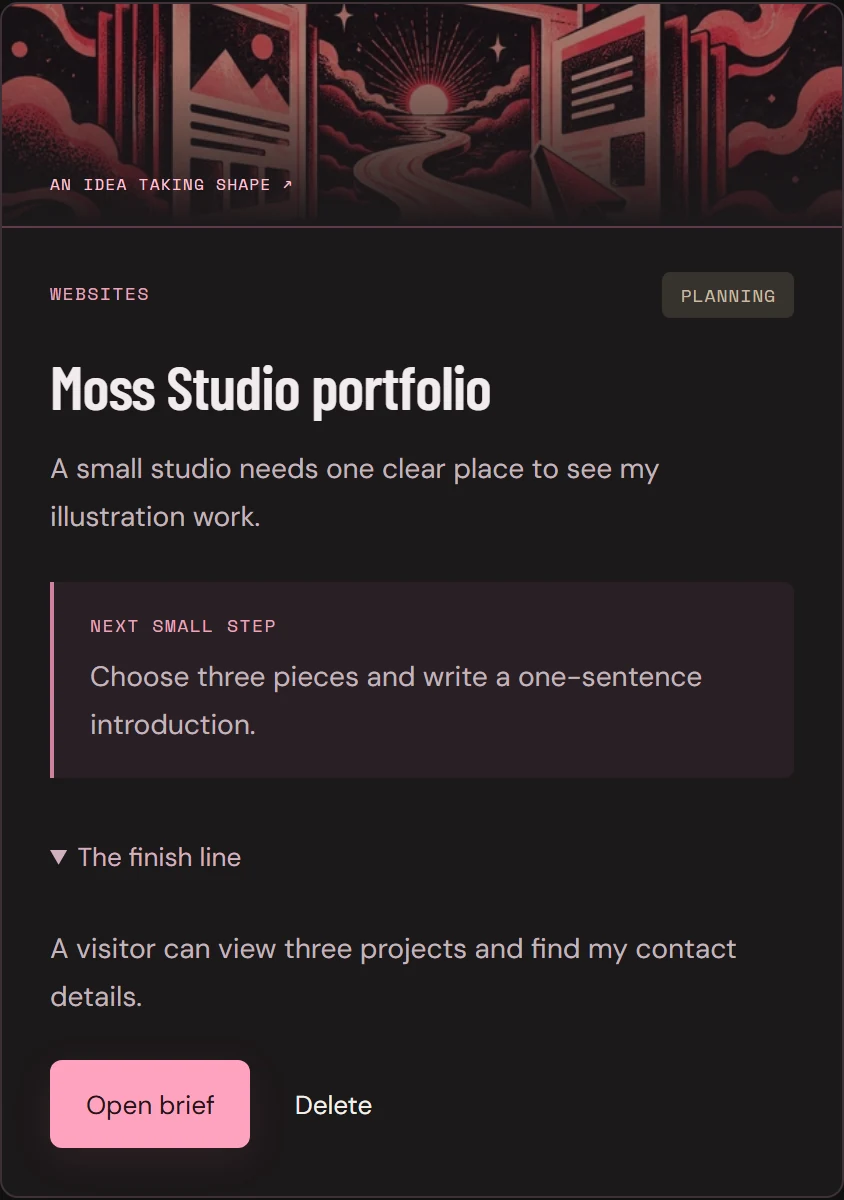
YOUR FREE MEMBERSHIP
Start planning your first build today. Dedicated game and mod lessons are coming soon.
Create your free accountConfirm your email, then follow Start Here: read your first lesson and save a private brief. Complete both steps to enter Community. No card or paid subscription required.
AI tools, generation credits and third-party hosting/provider costs are separate.
An optional Plus membership is planned for later at $49 USD/month. Features and launch details will be announced before it opens.
CONFIRM EMAIL → FIRST LESSON → FIRST BRIEF → COMMUNITY
Curious creators and business builders who want to make a website, app, video or workflow with AI agents. Choose a project you want to understand and improve. The academy teaches a process; it does not promise a particular income, completion time or project outcome.
You can start with a focused brief and the foundation lessons. Expect to work with prompts, files and practical checks. Some paths require more setup: the app example includes connecting your own practice Supabase backend. This is learning to build and inspect the work, including technical parts when your project needs them.
Choose Websites, Apps, Short Films, Videos & Content, AI Workflows, or Games & Mods. The first five paths bring lesson topics together with project directions inspired by Matt’s work. Game and mod lessons are coming soon; explore the project guide and shared starting skills in the meantime. Start Here and Finish & Share support every path. Short Films and Videos & Content currently share four video fundamentals; completing a shared lesson counts in both. New project walkthroughs are added as Matt records them.
Video lessons and project walkthroughs are being recorded and added as Matt completes them. Join free now to choose a path and plan your first build in My Builds. Dedicated game and mod lessons are coming soon.
Your own computer and the tools for your chosen path. The kit website and local workflow use Node.js; the app needs your own practice backend. Academy membership is free. Coding-agent plans, AI generation credits and third-party hosting/provider costs are separate.
Member community and one-hour group Zoom build clinics every other Saturday. See the upcoming dates above. Check Calendar inside the Academy for meeting details and replays as they’re added. Individual mentorship is arranged separately.
Create your free account and confirm your email. Start Here guides you through an introductory lesson and your private project brief. Complete both steps, then enter Community. You can explore Learn and My Builds along the way. No card or checkout is required.
No. Joining IV Academy is free and does not start a paid subscription. An optional Plus version is planned for later at $49 USD/month. Details will be announced before it opens.
THE NEXT IDEA DOESN’T HAVE TO STAY AN IDEA.
WHAT WILL YOU BUILD?